
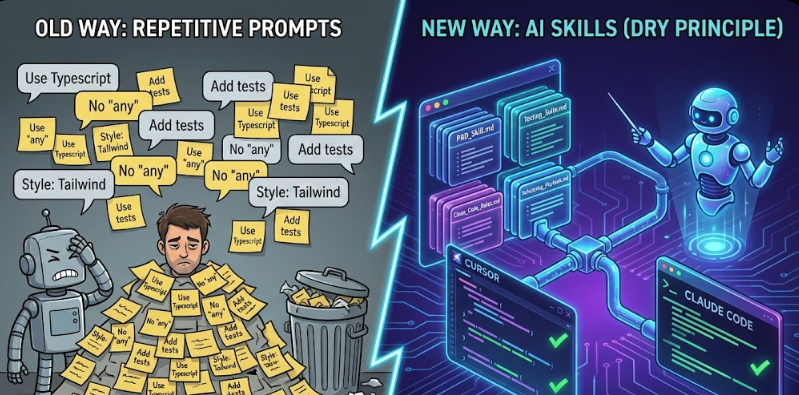
In the world of artificial intelligence and programming, many developers find themselves repeatedly typing the same instructions into AI chatbots. Commands like "Write in TypeScript," "Don't use external libraries," and "Include tests" are often repeated, which is a violation of the "Don't Repeat Yourself" (DRY) principle in programming. But why does this habit continue when interacting with neural networks?
This article introduces the concept of "Skills"—reusable capabilities for AI assistants that live directly in your project repository, making their actions more predictable, structured, and professional.
So, what exactly is a Skill? Simply put, a Skill is a persistent playbook that teaches AI to perform specific tasks according to your standards. Unlike a simple prompt, which is a one-time request, a Skill is a system component that is version-controlled with Git, stored in your project folder, and automatically invoked by the AI agent when a relevant task arises.
The key difference between a Skill and a system prompt (such as those used in tools like Claude or Cursor) is that while a prompt provides a broad role (e.g., "You are a programmer"), a Skill is a much more specific specialization (e.g., "You are an expert in writing PRDs for No-code MVPs").
In traditional software development, we have systems to enforce standards—like linters for code style, repository rules for architecture, and PR templates for processes. The issue with AI is that we don't have a system in place to define those standards, so the agent is left to guess what we mean every time. Skills help solve this by setting clear, consistent guidelines for AI interactions.
However, it's important to note that this concept is not exclusive to specific tools like Cursor or Claude Code; it's a layer that can be applied over various platforms, making agent behavior more portable and consistent across different systems.
An ideal Skill is not vague. For it to work effectively, it should include: - Scope: When should the Skill be activated? (e.g., "when creating a new endpoint"). - Context & Inputs: What information does the agent need before starting? - Process (Algorithm): A clear step-by-step plan (Chain of Thought). - Output Format: The desired structure of the response (e.g., Markdown templates, JSON schemas). - Quality Bar: A self-checklist to ensure the model meets quality standards. - Anti-patterns: Clear prohibitions on what the agent should never do.
Rather than creating separate instructions for different tools, we recommend using a unified structure that all tools can read, such as a standardized file system that includes: - AGENTS.md: Global project rules - router.md: Logic for selecting which Skill to use - skills/: Specific playbooks for tasks like PRDs, code reviews, testing, research, etc. - subagents/: Optional roles for larger tasks, like planning or reviewing.
This organization ensures clarity and prevents chaos. For example, the AGENTS.md file contains rules on style, safety, and response formats, while the skills/ folder houses specific playbooks for tasks like code reviews or testing. The router.md helps determine which Skill is relevant for a given task and directs the agent accordingly.
A Skill like "Webapp Testing," for example, would provide a toolkit for testing local web applications using Playwright. Each Skill includes essential details like name, description, and a set of triggers that guide when it should be activated. It also includes steps for how the agent should think through the task and the format in which the response should be delivered.
This setup is particularly useful for creating repeatable, high-quality work, such as automatically generating scripts for testing or generating research reports. By using Skills, teams can ensure that every interaction with AI agents is as efficient, predictable, and consistent as possible.
For businesses, this system of Skills means more streamlined processes and greater control over AI outputs, improving the overall productivity of teams. It’s a game-changer in terms of ensuring AI tools can meet specific, high-quality standards consistently across different projects and platforms. Competitors who embrace this approach may have an edge in terms of workflow automation and AI integration.
Informational material. 18+.