
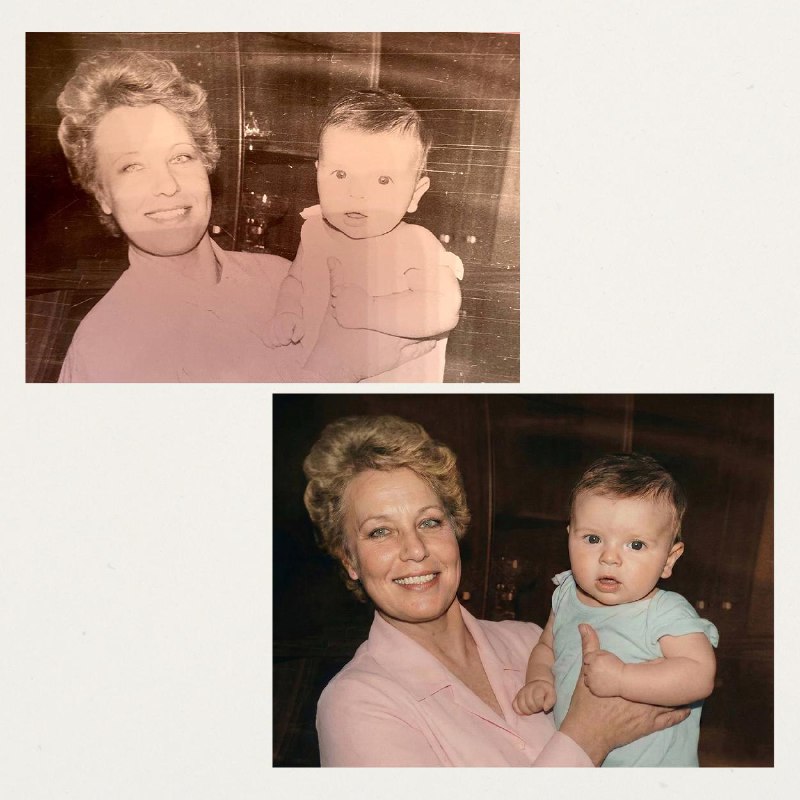
Restoring cherished family photographs has become much simpler with the advancements in artificial intelligence. Gone are the days of spending countless hours on tedious manual retouching. Today's AI technology can effectively revive faded and damaged images with just a single command, all while maintaining the historical integrity of the original photo. Here’s how you can restore your cherished images: First, visit the designated AI platform. Once there, navigate to the menu and select the option for image generation, specifically the Nano Banana or GPT Images feature. Next, upload your original photograph. In the prompt section, specify your restoration needs by typing: "Please restore this old photo: eliminate dust, scratches, stains, creases, and any scanning imperfections. Reconstruct any missing areas along the edges without introducing new details. It's crucial to retain the original likeness, including all facial characteristics, age, and expressions—avoid any beauty enhancements or unnatural appearances. Additionally, do not alter any text, badges, or symbols; keep them exactly as they are. Ensure that the photo is not cropped or perspective altered, and output the result in high resolution." If you wish to add color to the photo, simply append the following to your prompt: "Add color to the image using natural shades that reflect the time period (for example, the 1950s) while avoiding oversaturation." The quality of the scan plays a vital role in the success of the restoration process. The clearer the original image, the less the AI needs to infer, leading to a more authentic outcome. Best of all, the GPT Images service is free on the AI platform. For even higher quality results, consider using Nano Banana Pro, which is available through a premium subscription.
Informational material. 18+.